背景介绍 截止目前为止,JDK比较重要的时间节点和版本说明:
1996 JDK1.0
2004 JDK5.0 最重要的一个里程碑式的版本
2014 JDK8.0 排第二的里程碑式的版本 LTS
2017.9 JDK9.0 从此版本开始,每半年发布一个新的版本
2018.9 JDK11 LTS
2021.9 JDK17 LTS
如何学习一些新特性呢?
新的语法规则:自动拆箱和装箱、注解、enum、Lambda表达式、方法引用、switch表达式升级、try-with、record 等等;
增加、过时、删除 API:StringBuilder、ArrayList、新的日期时间的API、Optional 等。
底层的优化以及JVM参数的调整:GC的变化、内存结构(永久代–>元空间)。
Lambda 表达式(8+) 面向过程额面向对象编程 Java从诞生之日起就一直提倡“一切皆对象”,在java中面向对象编程(OOP)就是一切。但是随着 python、scala 等语言的兴起和新技术的挑战,Java不得不做出调整以便支持更加广泛的级数要求,即java不但可以支持OOP,还可以支持OOF(面向过程编程)。
Java8 引入了 Lambda 表达式之后,Java也开始支持函数式编程。
Lambda 不是最早使用的,目前 C++、C#、Python、Scala 等均支持 Lambda 表达式。
简单地说,面向对象的思想就是 “做一件事情,找一个能解决事情的对象,调用对象的方法,完成这件事”。函数式编程思想是 “只要能获取到结果,谁去做的,怎么做到都不重要,重视的是结果而非过程”。在函数式编程的语言中,函数被当做 一等公民对待。在将函数作为一等公民的编程语言当中,lambda 表达式的类型是函数。但是在 java8中有所不同。在java8中,lambda表达式是对象,而非函数,它们必须依附于一类特别的对象类型——函数式接口。Java8 中 Lambda表达式就是一个函数式接口(接口中只声明了一个抽象方法)的实例,只要一个对象是函数式接口的实例,那么该对象就可以用lambda表达式来表示。
Lambda表达式的本质:
一方面 lambda表达式作为接口的实现类的对象。
另一方面,lambda表达式是一个匿名函数。
1
2
3
4
5
6
7
8
9
10
11
12
13
14
15
16
@FunctionalInterface public interface Runnable { public abstract void run () ; } @FunctionalInterface public interface Comparator <T> { int compare (T o1, T o2) ; boolean equals (Object obj) ; default Comparator<T> reversed () { return Collections.reverseOrder(this ); } }
四大核心函数式接口 1 2 3 4 5 6 7 8 9 10 11 12 13 14 15 16 17 18 19 20 21 22 23 24 25 26 27 28 29 30 31 32 33 34 35 36 37 38 39 40 41 42 43 44 45 46 47 48 49 50 51 52 53 54 55 56 57 58 59 60 61 62 63 64 65 66 67 68 69 70 71 72 73 74 75 @FunctionalInterface public interface Consumer <T> { void accept (T t) ; default Consumer<T> andThen (Consumer<? super T> after) { Objects.requireNonNull(after); return (T t) -> { accept(t); after.accept(t); }; } } @FunctionalInterface public interface Supplier <T> { T get () ; } @FunctionalInterface public interface Function <T, R> { R apply (T t) ; default <V> Function<V, R> compose (Function<? super V, ? extends T> before) { Objects.requireNonNull(before); return (V v) -> apply(before.apply(v)); } default <V> Function<T, V> andThen (Function<? super R, ? extends V> after) { Objects.requireNonNull(after); return (T t) -> after.apply(apply(t)); } static <T> Function<T, T> identity () { return t -> t; } } @FunctionalInterface public interface Predicate <T> { boolean test (T t) ; default Predicate<T> and (Predicate<? super T> other) { Objects.requireNonNull(other); return (t) -> test(t) && other.test(t); } default Predicate<T> negate () { return (t) -> !test(t); } default Predicate<T> or (Predicate<? super T> other) { Objects.requireNonNull(other); return (t) -> test(t) || other.test(t); } static <T> Predicate<T> isEqual (Object targetRef) { return (null == targetRef) ? Objects::isNull : object -> targetRef.equals(object); } static <T> Predicate<T> not (Predicate<? super T> target) { Objects.requireNonNull(target); return (Predicate<T>)target.negate(); } }
Lambda 的一些示例: 1 2 3 4 5 6 7 8 9 10 11 12 13 14 15 16 17 18 19 20 21 22 23 24 25 26 27 28 29 30 31 32 33 34 35 36 37 38 39 40 41 42 @Test public void test01 () { Runnable r1 = new Runnable () { @Override public void run () { System.out.println("aaaa" ); } }; Runnable r2 = () -> System.out.println("aaaa" ); new Thread (r2).start(); } @Test public void test02 () { Consumer<String> c1 = new Consumer <>() { @Override public void accept (String s) { System.out.println(s); } }; Consumer<String> c2 = (String s) -> System.out.println(s); Consumer<String> c3 = s -> System.out.println(s); Consumer<String> c4 = System.out::println; c4.accept("aaaa" ); } @Test public void test03 () { Comparator<Integer> c1 = (o1, o2) -> { return o1.compareTo(o2); }; Comparator<Integer> c2 = (o1, o2) -> o1.compareTo(o2); Comparator<Integer> c3 = Integer::compareTo; int result = c3.compare(1 , 2 ); System.out.println(result); }
方法引用和构造器引用(8+) 方法引用可以看做是 Lambda 表达式的进一步刻画。当需要提供一个函数式接口的实例时,我们可以使用 Lambda 表达式提供此实例。当满足一定的条件的情况下,我们还可以使用方法引用或构造器引用来替换 Lambda 表达式。方法引用的本质还是函数式接口的一个实例。(仅仅牢记这一点——在Java中万事万物皆对象)。方法引用存在以下三种格式:
1 2 3 4 5 6 7 8 9 10 11 12 13 14 15 16 17 18 19 20 21 22 23 24 25 26 27 28 29 30 31 32 33 34 35 36 37 Consumer<String> c3 = s -> System.out.println(s); Consumer<String> c4 = System.out::println; User user = new User (1L , "zhangsan" );Supplier<String> s1 = () -> user.getName(); Supplier<String> s2 = user::getName; Function<Double, Long> f1 = new Function <Double, Long>() { @Override public Long apply (Double d) { return Math.round(d); } }; Function<Double, Long> f2 = d -> Math.round(d); Function<Double, Long> f3 = Math::round; Comparator<Integer> c1 = new Comparator <Integer>() { @Override public int compare (Integer o1, Integer o2) { return o1.compareTo(o2); } }; Comparator<Integer> c2 = (o1, o2) -> o1.compareTo(o2); Comparator<Integer> c3 = Integer::compareTo;
构造器引用的示例:
1 2 3 4 5 6 7 8 9 10 11 12 13 14 15 16 17 18 19 20 21 22 23 24 25 26 27 28 29 30 static class User { int id; public User () {} public User (int id) { this .id = id; } } @Test public void test05 () { Function<Integer, User> f1 = new Function <Integer, User>() { @Override public User apply (Integer id) { return new User (id); } }; Function<Integer, User> f2 = User::new ; } @Test public void test06 () { Function<Integer, User[]> f1 = new Function <Integer, User[]>() { @Override public User[] apply(Integer length) { return new User [length]; } }; Function<Integer, User[]> f2 = User[]::new ; }
强大的 Stream API(8+) Java8中最重要的改变,第一个是 Lambda 表达式,另一个则是 Stream API。Stream API(java.util.stream) 把真正的函数式编程风格引入到了java中,这是目前为止对java类库最好的补充,因为 stream API 可以极大提高程序员的生产力,让程序员写出高效、干净、简洁的代码。
Stream 是 Java8 中处理集合的关键抽象概念,它可以指定你希望对集合进行的操作,可以执行非常复杂的查找、过滤和映射数据等操作。使用 Stream API 对集合进行操作,就类似于使用 SQL 执行的数据库查询。怎么来理解 Stream 呢?实际上你可以把 Stream 看作是数据渠道,用于操作数据源(集合、数组等)所生成的元素序列。
Stream 和 Collection 集合的区别:Collection 是一种静态的内存数据结构,讲的是数据,它关注的是数据的存储,是面向内存的;而 Stream 是有关计算的,讲的是计算(排序、查找、过滤、映射、遍历等),是面向CPU的。需要注意的是:
Stream 不会自己存储元素;
Stream 不会改变源对象,它只会返回一个持有结果的新 Stream。
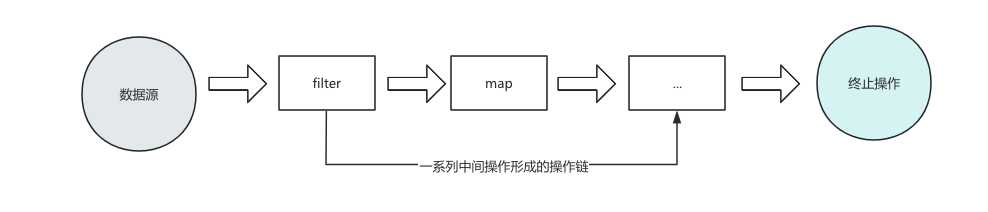
Stream 的操作是延迟执行的,这意味着它们会等到需要结果的时候才执行,即一旦执行终止操作,就执行中间操作链,并产生结果。
Stream 一旦执行了终止操作,就不能调用其他中间操作或终止操作了。
Stream 的操作三个步骤 一、创建Stream
通过一个数据源(如 集合、数组)获取一个流。
二、中间操作
每次操作都会返回一个持有结果的新Stream,即中间操作的方法返回值仍然是Stream类型的对象。因此中间操作可以是操作链,可对数据进行n次处理,但是在中介操作之前,并不会真正去执行。
三、终止操作
终止操作方法的返回值不再是Stream了,因此一旦执行终止操作,就结束整个Stream操作了。一旦执行终止操作,就执行中间操作链,最终产生结果并结束Stream。
创建 Stream 1 2 3 4 5 6 7 8 9 10 11 12 13 14 15 16 17 18 19 20 21 22 23 24 25 26 27 28 29 30 31 32 33 34 @Test public void test01 () { List<String> list = Arrays.asList("AA" , "BB" , "CC" , "DD" , "EE" ); Stream<String> stream1 = list.stream(); Stream<String> stream2 = list.parallelStream(); System.out.println(stream1.getClass()); System.out.println(stream2.getClass()); } @Test public void test02 () { Integer[] array1 = {1 ,2 ,3 ,4 ,5 }; Stream<Integer> stream1 = Arrays.stream(array1); System.out.println(stream1); int [] array2 = {1 ,2 ,3 ,4 ,5 }; IntStream stream2 = Arrays.stream(array2); System.out.println(stream2); } @Test public void test03 () { Stream<Integer> stream = Stream.of(1 , 2 , 3 , 4 ); System.out.println(stream); }
中间操作举例 1 2 3 4 5 6 7 8 9 10 11 12 13 14 15 16 17 18 19 20 21 22 23 24 25 26 27 28 29 30 31 32 33 34 35 36 37 38 39 40 41 42 43 44 45 46 47 48 49 50 51 52 53 54 55 56 57 58 59 60 61 62 63 64 65 66 67 68 69 70 71 72 73 74 75 76 77 78 79 80 81 82 83 84 85 86 87 88 89 90 91 92 93 94 95 96 97 98 99 100 101 102 103 104 105 106 107 108 109 110 111 112 113 114 115 116 117 @Test public void test01 () { empList.stream() .filter(emp -> emp.getSalary() > 7000 ) .forEach(System.out::println); System.out.println(); empList.stream() .limit(2 ) .forEach(System.out::println); System.out.println(); empList.stream() .skip(2 ) .forEach(System.out::println); System.out.println(); empList.stream() .distinct() .forEach(System.out::println); System.out.println(); } @Test public void test02 () { List<Integer> list = List.of(1 , 2 , 3 , 4 , 5 , 1 , 2 ); list.stream() .takeWhile(n -> n < 4 ) .forEach(System.out::println); System.out.println(); list.stream() .dropWhile(n -> n < 4 ) .forEach(System.out::println); } @Test public void test03 () { Stream.of("a" , "b" , "c" ) .map(String::toUpperCase) .forEach(System.out::println); } @Test public void test04 () { Integer[] array = {121 , 12 , 1 , 2 , 3 , 4 , 43 }; Arrays.stream(array) .sorted() .forEach(System.out::println); System.out.println(); Arrays.stream(array) .sorted((o1, o2) -> - o1.compareTo(o2)) .forEach(System.out::println); } @Test public void test05 () { Stream.of("hello" , "world" ) .flatMap(str -> Arrays.stream(str.split("" ))) .forEach(System.out::print); System.out.println(); empList.stream() .mapToInt(Emp::getAge) .forEach(System.out::println); } @Test public void test06 () { empList.stream() .filter(emp -> emp.getSalary() > 7000 ) .peek(emp -> System.out.println("过滤后的员工: " + emp.getName())) .map(Emp::getName) .forEach(System.out::println); }
终止操作举例 1 2 3 4 5 6 7 8 9 10 11 12 13 14 15 16 17 18 19 20 21 22 23 24 25 26 27 28 29 30 31 32 33 34 35 36 37 38 39 40 41 42 43 44 45 46 47 48 49 50 51 52 53 54 55 56 57 58 59 60 61 62 63 64 65 66 67 68 69 70 71 72 73 74 75 76 77 78 79 80 81 82 83 84 85 86 87 88 89 90 91 92 93 94 95 96 97 98 99 100 101 102 103 104 105 106 107 108 109 110 111 112 113 114 115 116 117 118 119 @Test public void test201 () { boolean result1 = empList.stream() .allMatch(emp -> emp.getAge() > 18 ); System.out.println(result1); boolean result2 = empList.stream() .anyMatch(emp -> emp.getAge() > 18 ); System.out.println(result2); Optional<Emp> firstOptional = empList.stream() .findFirst(); System.out.println(firstOptional.get()); } @Test public void test202 () { long count = empList.stream().count(); System.out.println(count); System.out.println(); Optional<Emp> maxOptional = empList.stream().max(Emp::compareTo); System.out.println(maxOptional.get()); System.out.println(); empList.stream().forEach(System.out::println); empList.forEach(System.out::println); empList.parallelStream().forEachOrdered(System.out::println); } @Test public void test203 () { List<Integer> list = Arrays.asList(1 , 2 , 3 , 4 , 5 , 6 , 7 , 8 , 9 , 10 ); Integer result = list.stream().reduce(0 , Integer::sum); System.out.println(result); } @Test public void test206 () { Double totalSalary = empList.stream().mapToDouble(Emp::getSalary).sum(); System.out.println("总薪资:" + totalSalary); OptionalDouble avgAge = empList.stream().mapToInt(Emp::getAge).average(); avgAge.ifPresent(avg -> System.out.println("平均年龄:" + avg)); DoubleSummaryStatistics stats = empList.stream().mapToDouble(Emp::getSalary).summaryStatistics(); System.out.println("最高薪资: " + stats.getMax()); System.out.println("平均薪资: " + stats.getAverage()); } @Test public void test205 () { List<Emp> empList1 = empList.stream() .filter(emp -> emp.getSalary() > 7000 ) .collect(Collectors.toList()); empList1.forEach(System.out::println); System.out.println(); List<Emp> empList2 = empList.stream() .sorted(Comparator.comparingInt(Emp::getAge)) .collect(Collectors.toList()); empList2.forEach(System.out::println); LinkedList<Emp> empList3 = empList.stream() .collect(Collectors.toCollection(LinkedList::new )); empList3.forEach(System.out::println); Map<Integer, String> idToNameMap = empList.stream() .distinct() .collect(Collectors.toMap(Emp::getId, Emp::getName)); String namesStr = empList.stream() .map(Emp::getName) .collect(Collectors.joining(", " , "[" , "]" )); System.out.println(namesStr); Map<String, List<Emp>> deptEmpMap = empList.stream() .collect(Collectors.groupingBy(Emp::getDept)); System.out.println(deptEmpMap); Map<Boolean, List<Emp>> salaryPartition = empList.stream() .collect(Collectors.partitioningBy(emp -> emp.getSalary() > 7000 )); System.out.println(salaryPartition); }
关于 lambda 和 stream 的进一步说明 lambda 和 匿名内部类的区别 在 Java 8 刚刚推出 Lambda 的时候,很多人为了方便理解,会说“Lambda 就是匿名内部类的语法糖”。但实际上,Lambda 的底层实现和匿名内部类有着本质的区别。
从编译结果来看:编译器在编译时,会实打实地为匿名内部类生成一个新的 .class 文件(命名格式通常为 OuterClass$1.class)。而对于Lambda 表达式,编译后不会生成额外的 .class 文件。Lambda 的代码会被转换为当前类的一个私有静态方法(Private Static Method)。
从底层机制来看:匿名内部类 遵循传统的类加载机制。每一次 new 都会经历类加载、创建实例、初始化等一整套繁重的流程。Lambda 表达式采用了 Java 7 引入的 invokedynamic(简称 Indy)指令,它在运行期第一次执行时,通过一组 “引导方法(Bootstrap Method)”动态地在内存中生成一个轻量级的代理类。关键在于,这个生成过程是在内存中直接完成的,而且只在第一次调用时执行一次。
从内存与对象创建来看:匿名内部类每次执行到 new 的地方,必定会在堆内存中创建一个全新的对象。Lambda 表达式如果没有捕获外部变量,JVM 就会把它优化为一个静态单例(Singleton),后续无论调用多少次,都复用同一个对象。只有在捕获了外部变量时,才会动态创建新对象,但由于没有匿名内部类那些复杂的类结构,它的对象头和内存占用也更加轻量。
匿名内部类和 Lambda 在语义上最大的不同,就是对 this 的解释,举个例子:
1 2 3 4 5 6 7 8 9 10 11 12 13 14 15 16 17 18 public class LambdaTest { public void doSomething () { Runnable r1 = new Runnable () { @Override public void run () { System.out.println(this .getClass().getName()); } }; Runnable r2 = () -> { System.out.println(this .getClass().getName()); }; } }
匿名内部类是编译期决定的“重量级”类文件生成;而 Lambda 是运行期通过 invokedynamic 动态按需生成的“轻量级”函数对象。正是因为这种底层的彻底重构,Java 的 Lambda 表达式和流式接口才能在保证代码优雅的同时,依然拥有极高的运行效率。
无状态的 Lambda(不捕获外部变量):
1 2 3 list.forEach(item -> System.out.println(item));
有状态的 Lambda(捕获了外部变量):
1 2 3 4 int limit = 10 ;list.forEach(item -> { if (item > limit) System.out.println(item); });
Stream 无法避免的临时对象 虽然 Lambda 本身很高效,但 Stream API 则是另一码事。当你写下一长串漂亮的链式调用时,底层的内存其实是在“默默承受”的。Stream 的核心思想是管道与流水线(Pipeline) 。当你每调用一个中间操作(如 .filter(), .map(), .distinct()),Java 底层为了记住这个操作,通常都会创建一个新的流阶段对象(如 MapOp, FilterOp 等内部实现类)。
1 2 3 4 List<String> result = list.stream() .filter(s -> s.length() > 3 ) .map(String::toUpperCase) .collect(Collectors.toList());
如果你把上面这段代码放在一个执行百万次的循环里面,即使 Lambda 本身是单例的,Stream 链条上的每一个步骤都会频繁地创建和销毁临时对象。这会直接导致:
内存占用短暂飙升。
触发 Minor GC(年轻代垃圾回收)的频率变高,从而间接消耗 CPU。
平时开发到底用不用?遵循以下原则即可:
业务代码(95% 的场景):放心大胆地用。 现代 JVM(尤其是 Java 11 / 17 / 21+ 以及专为流优化的垃圾回收器如 ZGC/G1)处理这些生命周期极短的临时对象极其高效。为了那几微秒的提升而放弃 Stream 的可读性,通常是得不偿失的。核心热点代码(如每秒执行几十万次的循环):改回传统 For 循环。 如果在监控(如 Arthas 或 JProfiler)中发现某个方法是性能热点,且流式操作产生了大量的 java.util.stream 相关对象,果断重构成传统的 for 循环。处理基本类型时,务必使用特化流。 永远不要用 Stream,而是用 IntStream、LongStream 或 DoubleStream。这样可以避免基本类型(int)和包装类(Integer)之间频繁装箱产生的恐怖对象量。
Jshell(9+) 命令行中通过 jshell 指令,调取 jshell 工具(类似于浏览器对js的支持,或者python控制台编码)。常用的指令如下:
/help
/list:列出当前 session 里所有的有效的代码片段
/vars:查看当前 session 下的所有创建过的变量
/methods:查看当前 session 下的所有创建过的方法
/imports:列出导入的包
/history:键入内容的历史记录
/edit:使用外部代码编辑器来编写 java 代码
/exit:退出 jshell 工具
try-with 新特性(7+) 所有实现了 AutoCloseable 的接口都可以使用以下方式进行优雅地资源释放。
1 2 3 public interface AutoCloseable { void close () throws Exception; }
1 2 3 4 5 6 7 8 9 10 11 12 13 14 15 16 17 18 19 20 21 22 23 24 25 26 27 28 29 30 @Test public void test001 () { FileWriter fw = null ; BufferedWriter bw = null ; try { fw = new FileWriter ("test.txt" ); bw = new BufferedWriter (fw); bw.write("hello world" ); } catch (IOException e) { e.printStackTrace(); } finally { try { if (bw != null ) { bw.close(); } } catch (IOException e) { e.printStackTrace(); } } } @Test public void test002 () { try (FileWriter fw = new FileWriter ("test.txt" ); BufferedWriter bw = new BufferedWriter (fw)){ bw.write("hello world" ); } catch (IOException e) { e.printStackTrace(); } }
类型推断(10+) 1 2 3 4 5 6 7 8 9 10 11 12 13 14 15 16 17 18 19 20 21 22 23 24 @Test public void testVar () { var list = new ArrayList <String>(); var set = new LinkedHashSet <Integer>(); for (var v : list) { System.out.println(v); } for (var i = 0 ; i < 100 ; i++) { System.out.println(i); } Map<String, Integer> mm = new HashMap <>(); Set<Map.Entry<String, Integer>> entries1 = mm.entrySet(); var entries2 = mm.entrySet(); }
自动匹配类型(14+) 1 2 3 4 5 6 7 8 9 10 if (obj instanceof String) { String s = (String) obj; } if (obj instanceof String s) { }
switch 表达式(12+) 1 2 3 4 5 6 7 8 9 10 11 12 13 14 15 16 17 18 19 20 21 22 23 24 25 26 27 28 29 30 31 32 33 34 @Test public void test31 () { Week day = Week.SUNDAY; switch (day) { case MONDAY: System.out.println(1 ); break ; case TUESDAY: case WEDNESDAY: case THURSDAY: System.out.println(2 ); break ; case SATURDAY: case SUNDAY: System.out.println(4 ); break ; default : throw new RuntimeException ("参数非法" ); } } @Test public void test32 () { Week day = Week.SUNDAY; int result = switch (day) { case MONDAY -> { yield 1 ; } case TUESDAY, WEDNESDAY, THURSDAY -> 2 ; case SATURDAY, SUNDAY -> 4 ; default -> throw new RuntimeException ("参数非法" ); }; System.out.println(result); }
多行文本(14+) 1 2 3 4 5 6 7 8 9 10 11 12 13 14 15 16 17 18 19 20 21 @Test public void test010 () { String s1 = """ <html> <head> </head> <body> <div>haha</div> </body> </html> """ ; System.out.println(s1); String s2 = """ select id,name,age \ from t_user u \ where id > 4 \ order by id desc """ ; System.out.println(s2); }
密封类(17+) 1 2 3 4 5 6 7 8 sealed class Person permits Student, Teacher {}final class Student extends Person {}sealed class Teacher extends Person permits MathTeacher {}final class MathTeacher extends Teacher {}
Record 类(16+) 在 Java 14 作为预览特性引入、并在 Java 16 正式转正的 Record(记录类型),是 Java 近年来最受欢迎的特性之一。它的核心目的非常纯粹:消除那些为了单纯“传递数据”而不得不写的海量样板代码,让 Java 的数据载体类(POJO / DTO)变得极其干净。在没有 Record 之前,如果你想写一个只有只读属性的 Point(坐标点)类,你需要写:
私有字段 (private final)
构造方法
所有的 Getter 方法
toString() 方法
equals() 和 hashCode() 方法
即便用 IDE 自动生成或使用 Lombok 插件,代码依然臃肿。而使用 Record,只需要一行代码。
1 2 3 4 5 6 7 8 9 10 11 12 13 14 15 16 17 18 19 20 21 22 23 public final class OldPoint { private final int x; private final int y; public OldPoint (int x, int y) { this .x = x; this .y = y; } public int getX () { return x; } public int getY () { return y; } @Override public boolean equals (Object o) { ... } @Override public int hashCode () { ... } @Override public String toString () { ... } } public record Point (int x, int y) {}
当你声明一个 public record Point(int x, int y) {} 时,Java 编译器在底层会自动为你做以下事情:
不可变性 (Immutable):每个属性在底层都是 private final 的。
特殊的 Getter:生成的方法名没有 get 前缀,直接和属性名一致。例如:point.x() 和 point.y()。
自带三大件:自动重写了规范的 equals()、hashCode() 和 toString()(格式为 Point[x=1, y=2])。
继承限制:Record 隐式继承自 java.lang.Record。因为 Java 是单继承,所以 Record 不能再继承其他类,但可以实现接口。同时,Record 类本身是 final 的,不能被其他类继承。
Record 绝对不仅是一个“死板”的数据容器,它支持自定义构造器、实例方法和静态属性。
1 2 3 4 5 6 7 8 9 10 11 12 13 14 15 16 17 18 19 20 21 22 23 24 25 26 27 28 29 30 31 32 33 34 35 36 37 38 39 40 41 42 43 44 45 46 47 48 49 50 public record Emp (Long id, String name, double salary) implements Serializable { public static final double MIN_SALARY = 3000.0 ; public Emp { if (name == null || name.isBlank()) { throw new IllegalArgumentException ("员工姓名不能为空" ); } if (salary < MIN_SALARY) { salary = MIN_SALARY; } } public Emp (String name) { this (0L , name, MIN_SALARY); } public boolean isHighEarner () { return this .salary > 10000 ; } }
测试使用:
1 2 3 4 5 6 7 8 9 10 11 12 13 14 15 16 17 18 19 20 @Test public void testRecord () { Emp emp1 = new Emp (1L , "张三" , 12000.0 ); Emp emp2 = new Emp ("李四" ); System.out.println(emp1.name()); System.out.println(emp2.salary()); System.out.println(emp1); Emp emp3 = new Emp (1L , "张三" , 12000.0 ); System.out.println(emp1.equals(emp3)); System.out.println(emp1.isHighEarner()); }
Record 非常适合以下场景:
DTO(数据传输对象):RPC 调用、Controller 接收或返回的各种 Request/Response 载体。
数据库映射(部分情况):如像 MyBatis / JdbcTemplate 查询出来的只读结果集。
临时数据组合:在 Stream 流处理过程中,如果需要同时传递两个关联值,可以定义一个局部(Local)Record 快速打包。
注意:Record 不适合用作传统的 Hibernate/JPA 实体类(Entity)。因为 JPA 实体通常依赖代理、延迟加载,且强烈需要可变的 setter 方法,这与 Record 的强不可变性背道而驰。